
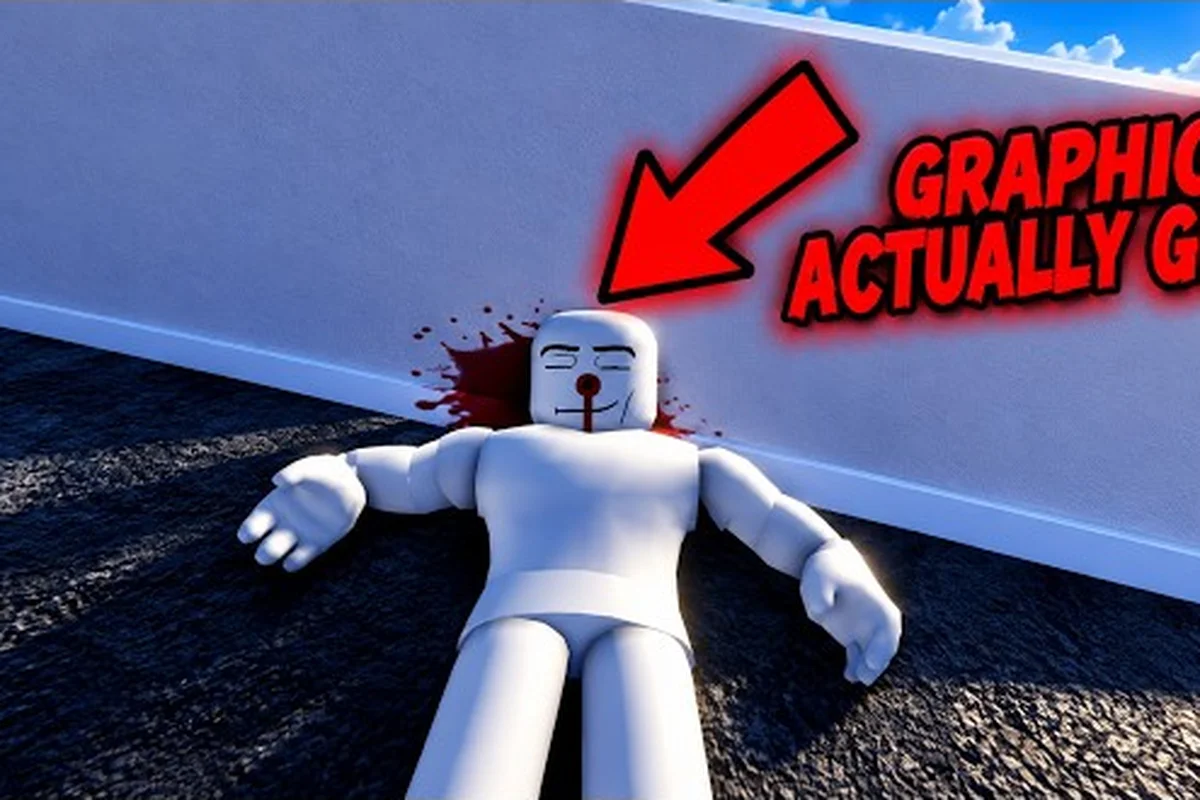
Ragdoll reality basic mechanics determine what happens when you attack, grab, launch, or injure a dummy. Learning them matters because the official game page shows a physics sandbox where the hit location shapes the reaction, and that detail changes how every weapon should be tested.
Game Overview and Core Loop
Ragdoll Reality is a Roblox physics sandbox developed by the group I am eating. Its central activity is straightforward: choose a target, land an attack, watch the body react, and repeat with a different tool or location. The official Ragdoll Reality game page identifies the experience as a single-player game with a maximum of one player and no listed VIP server support as of October 25, 2026.
That server information matters for ragdoll reality first time playing because it means you can focus entirely on experimentation. There is no waiting for a party leader, coordinating an objective, or relying on another player to revive a target. The official page captured roughly 9.55 million visits, 55,700 concurrent players, 34,700 favorites, and a like-to-dislike ratio of about 9,761 to 2,142, although those figures naturally change over time.
What makes the sandbox distinctive?
The defining feature is location-based damage. A strike to the leg can leave a dummy limping or crawling, while an arm hit can make that arm hang while the target clutches the wound. Dummies may also stagger, fight back, run away, and recover after falling. These are not merely animated hit states; they are physical outcomes tied to where the impact lands.
| Core element | What it does | Why a beginner should test it |
|---|---|---|
| Dummy selection | Gives you a target for practice | Lets you isolate one behavior at a time |
| Hit location | Determines the visible reaction | Teaches the sandbox’s physical damage model |
| Tool choice | Changes speed, reach, or impact | Encourages meaningful weapon comparisons |
| Play environment | Includes hazards and a tower | Adds vertical movement and environmental challenges |
| Graveyard | Converts thrown dummies into zombies | Opens a different enemy behavior set |
| Horde mode | Starts a wave-survival scenario | Tests sustained combat and target management |
A useful ragdoll reality game overview should distinguish the sandbox’s base interactions from optional systems. You do not need to master every hazard before learning to control a blade or line up a shot. Start with the standard dummy, observe one body area at a time, and add complexity only after you understand the result.
For a broader first-session structure, the Ragdoll Reality Roblox Guide: First Session Basics can help you organize the sandbox areas. This ragdoll reality guide focuses more closely on the cause-and-effect rules that make each interaction easier to read.
Basic Mechanics: Hits, Limbs, and Recovery
The central ragdoll reality basic mechanics rule is simple: where you hit affects what happens next. An arm strike, leg strike, or strike to the torso can create different movement patterns because the affected body part changes the dummy’s balance and available actions. The official page also says limbs can detach and wounds can bleed, adding consequences beyond a standard health bar.
| Target area | Likely physical result | Beginner experiment |
|---|---|---|
| Head | Strong disruption and a larger chance of knockdown | Test whether a blunt tool creates a different arc than a blade |
| Torso | Broad impact reaction and loss of posture | Compare a direct center hit with a glancing strike |
| Arm | Arm may hang while the dummy holds the wound | Control your swing so the contact point stays accurate |
| Leg | Limp, crawl, or slower movement | Aim low to see whether the target’s mobility changes |
| Detached limb | Permanent-looking loss of that limb in the current session | Record which tool caused the most separation |
The key is to control the setup before judging the tool. Stand close enough for a predictable contact area, keep the target stationary, and use one weapon for several consecutive trials. Changing distance, angle, and weapon simultaneously makes it difficult to identify which variable produced the result.
Damage is physical, not just numerical
A health bar can tell you that a target has been hurt, but it may not explain the full experience. The limb movement, stagger, and recovery provide information about the impact. This makes hit placement more valuable than repeatedly pressing the attack button without aiming.
A good practice method is to keep a simple record: for each hit, log the weapon, body area, and contact point, then describe how the ragdoll balance changes. For example, a kick to the knee may cause a quick collapse, while a strike to the torso can rotate the upper body and interrupt a standing attack. Recording those differences makes hit placement easier to compare across weapons and reveals which contacts produce the clearest physical reaction.
-
Name the tool used.
-
Identify the intended contact area.
-
Note the immediate reaction, such as a limp, stagger, or knockback.
-
Record whether the target rises, crawls, fights back, or runs.
-
Repeat from the same distance before changing only one variable.
This method turns a chaotic physics sandbox into a controlled test. It also makes it easier to compare the basic properties of different tools without relying on an unverified damage number. If you want a broader look at the available arsenal, the Ragdoll Reality All Weapons: 12+ Roster and Uses reference can serve as a catalog while you test each tool in practice.
First Time Playing: A Structured Test Plan
A productive first session should move from a stable target to a moving one, then to environmental hazards. Skipping directly to the most chaotic weapon may produce entertaining results, but it also makes it difficult to learn cause and effect. The Ragdoll Reality How to Start: A First-Hour Plan provides a broader progression plan that pairs well with the testing method below.
| Phase | Target | What to observe | Time target |
|---|---|---|---|
| Baseline | Stationary dummy | Clean hit reaction and recovery | 5 minutes |
| Precision | Selected limb | Contact placement and visible wound behavior | 10 minutes |
| Mobility | Walking or fleeing dummy | Tracking, range, and knockdown timing | 10 minutes |
| Environment | Playground hazards | Gravity, launch direction, and environmental impact | 10 minutes |
| Height | 80-stud tower | Vertical control and landing reactions | 10 minutes |
| Horror layer | Graveyard and Horde mode | Conversion, chase, pounce, bite, and infection | 10 minutes |
Build one clean baseline
Begin with a dummy that is not moving and choose the safest available weapon. Land a light hit, then a stronger hit, and compare the results. This baseline reveals the default reaction without interference from a target’s movement. Once you understand it, repeat the same test with a different weapon while keeping the angle consistent.
Add target movement deliberately
After establishing the baseline, let the dummy move. It may stagger, fight back, flee, rise, or resume activity, so the timing of an attack becomes more important. Wide swings can work against a moving target but may also connect with an unintended limb. A controlled thrust or aimed projectile can be easier to evaluate because the contact point is more predictable.
Test the playground and tower
The official game page highlights playground hazards and an 80-stud tower. These areas add verticality to the basic mechanics. Gravity, falling height, and collision surfaces can change the result after the initial impact, so compare what happens during contact with what happens after the body hits the ground.
Test the graveyard and Horde mode
The Halloween update changes the graveyard into a conversion point. Throwing a dummy into it produces a zombie, and the official page identifies slow, normal, and fast speed classes. Zombies can chase, pounce, and bite, while a bitten dummy becomes infected and can convert others. The Horde button launches a wave-survival mode. Exact zombie health, bite damage, and wave population are not published, so treat those values as unknown rather than guessing.
Guide to Reading Reactions
Every reaction is feedback. If a target crawls after a leg hit, then the contact area may have been accurate. If it recovers and runs, the impact was not enough to keep it down. If a body part hangs loose, the blow may have caused more severe separation. Learning to interpret these states is what separates random experimentation from deliberate play.
| Observed reaction | Likely interpretation | Next useful test |
|---|---|---|
| Target staggers but stays upright | The impact disrupted balance without fully disabling the target | Repeat with a different power or contact area |
| Target falls and rises | Knockdown occurred, but recovery is possible | Attack during the recovery window |
| Target limps or crawls | A leg-related effect appears to be active | Compare low and high strikes from equal distance |
| Target clutches an arm | The arm took the most meaningful hit | Test a slightly different swing path |
| Target runs away | The dummy is actively reacting to danger | Test a ranged tool or a faster approach |
| Zombie appears after a graveyard throw | Conversion triggered successfully | Compare the three reported speed classes |
| A bitten dummy becomes infected | Infection can spread between targets | Test whether an infected target can convert others |
Separate cause from animation
Some reactions occur immediately, such as a stagger or loss of balance. Others follow the impact, such as bleeding, hanging limbs, or a changed movement pattern. Track both the first frame of contact and the result several seconds later. That distinction helps you tell a direct weapon effect from a physics consequence caused by falling or dragging.
Use community experience carefully
Player reports are useful for spotting recurring quirks, but they should not replace the current official game page. Because updates can change control behavior, tool interactions, and event availability, label community observations by date and compare them with what you can reproduce. The most reliable result is one that you test yourself in the current version.
Watch for version-dependent changes
The official page was verified on October 25, 2026, and describes an experience launched on October 13, 2026. An early release may receive balance or interface changes quickly. If a weapon, tower detail, or zombie rule behaves differently from the descriptions here, your current client may simply be running a newer version. The Ragdoll Reality Getting Started: Essential First-Session Steps guide remains useful for locating current areas, but firsthand testing should decide which details still apply.
First Session Practice Goals and Useful Experiments
By the end of your first session, you should be able to explain why two similar attacks produced different outcomes. That means understanding the contact area, the weapon’s behavior, the target’s motion, and the environment. The goal is not to defeat one dummy once; it is to develop a reliable way to repeat useful results.
Beginner experiment checklist
-
Clean strike: Land one controlled hit on a stationary torso and record the reaction.
-
Limb comparison: Test an arm and a leg from the same distance with the same tool.
-
Damage threshold: Determine whether light, medium, and strong hits create different recovery times.
-
Moving target: Test the same weapon while the dummy walks, flees, or rises.
-
Ground interaction: Compare a target hit on flat ground with one struck near an obstacle or edge.
-
Vertical landing: Use the 80-stud tower to see how height changes the final body state.
-
Zombie conversion: Move a dummy into the graveyard and compare its behavior with a normal target.
-
Horde survival: Enter wave mode after learning the three basic zombie behaviors.
| Experiment | Controlled variable | What to change | Best reason to run it |
|---|---|---|---|
| Contact-area test | Distance and weapon | Hit location | Teaches the clearest physical damage rule |
| Recovery test | Hit location | Force or timing | Shows how quickly a target can return |
| Tracking test | Weapon | Target movement | Separates handling skill from body damage |
| Height test | Contact point | Launch elevation | Isolates falling physics from weapon impact |
| Zombie test | Target type | Infection state | Shows how conversion changes movement |
A simple experiment log
A note-taking app or spreadsheet is enough to create a useful ragdoll physics baseline. For each test, record the tool, struck body area, distance, intended target state, immediate reaction, and later outcome; adding the impulse direction and whether the limb was already moving helps separate a weak contact impulse from an unstable joint or collision. For example, compare a center-mass hit with a forearm hit at the same distance: the torso should produce a larger overall displacement, while the forearm may reveal how contact transfers momentum through the ragdoll. Repeating each setup two or three times exposes inconsistent joint behavior that a single memory-based observation would miss, making the reference more dependable than a vague recollection of what happened.
For example, if a machete frequently leaves an arm hanging but a pistol causes a cleaner stagger, the log will show that the difference may be tied to reach, impact location, or the tool’s motion. You can then test that theory without guessing. If you want specialized instruction, the Ragdoll Reality How to Use Machete: Timing and Limb Strikes guide can help with blade timing, while direct experimentation determines the best result for your aim.
Basic Mechanics Summary
Ragdoll reality basic mechanics come down to three layers: the impact changes the body, the body changes its movement, and the environment changes the final outcome. Accurate contact points, deliberate weapon tests, and attention to recovery produce better results than chaotic button pressing.
Start with a stationary dummy, compare arm and leg hits, then introduce movement, hazards, the 80-stud tower, graveyard conversion, and Horde mode. Use the official page for current features and player reports for possible quirks, but confirm mechanics through repeatable tests. That approach gives you a clear ragdoll reality game overview and a practical foundation for every later weapon or objective.
Frequently Asked Questions
Is Ragdoll Reality multiplayer?
According to the official game page as of October 25, 2026, the server is single-player with a listed maximum of one player. No VIP servers are enabled, so the current sandbox is designed for individual testing rather than cooperative objectives or shared battles.
What is the most important mechanic for beginners?
Hit placement is the most useful mechanic to learn first. A leg impact can produce a limp or crawl, while an arm impact can leave the arm hanging. Keeping distance and angle consistent makes these reactions easier to compare and teaches you how contact area affects movement.
How do dummies react after being knocked down?
Dummies can stagger, retaliate, retreat and rise again, so a knockdown is not necessarily permanent. Watch the target after the impact because recovery timing can create a better opening for a second strike than attacking immediately after the fall.
What happens in the graveyard and Horde mode?
In the graveyard, thrown dummies can become zombies, with the official page listing slow, normal, and fast classes. Their behavior changes the encounter: slower zombies provide easier chase targets, while faster ones close distance quickly, making timing and positioning important. Infected dummies can also convert into additional enemies, so the Horde button starts wave survival rather than a controlled single-target test.
Should every weapon be tested at the same target distance?
Only when you want a direct comparison. Use a fixed distance for an apples-to-apples test, then vary it to learn each tool’s effective range. Changing one variable at a time makes it possible to separate weapon behavior from aim, timing, and target movement.