
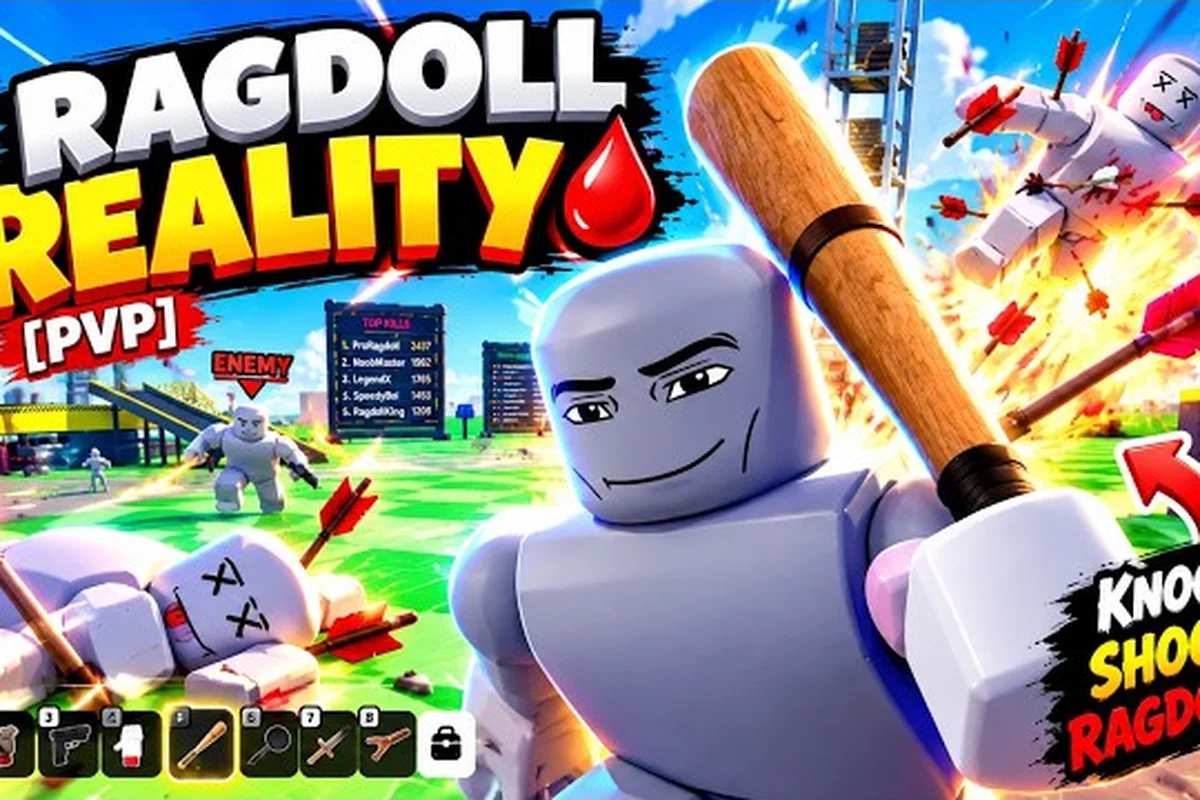
The Ragdoll Reality game page is the fastest place to confirm device support, controller options, and the solo-play setup before you join. This guide explains what the official listing actually publishes, so you can check compatibility and age suitability without guessing.
Game Page: What Players Need to Know
The Ragdoll Reality game page confirms the essentials for solo play: Roblox device support, a one-player server limit, standard controls, and more than 20 weapons. That weapon roster gives players meaningful loadout options, while the one-player cap keeps matches focused on individual ragdoll combat rather than team-based objectives. Checking supported devices and controller support before joining helps avoid input or performance issues, and players should also verify the age rating to confirm the experience is appropriate for their audience.
Supported Devices and System Requirements
Ragdoll Reality is a Roblox physics sandbox, so its technical requirements follow Roblox rather than a separate specification list. The official Ragdoll Reality game page on Roblox does not publish dedicated minimum processor, graphics, memory, or storage figures. Players should therefore check the current Roblox client requirements for their chosen device and operating system.
Desktop and Mobile Compatibility
Roblox supports modern Windows, macOS, Android, and iOS devices, although exact performance depends on the phone model, operating-system version, graphics settings, and network connection. A device that can run Roblox comfortably is the practical baseline for Ragdoll Reality, because the game adds physics, enemies, weapons, and map hazards to that same platform load.
| Platform | Practical support level | What players should verify |
|---|---|---|
| Windows PC | Recommended for the broadest setup choices | Roblox client performance, controller connection, and available storage |
| macOS | Supported through Roblox when the system meets current client needs | Frame rate, available memory, and input latency |
| Android | Supported through the Roblox mobile app | Device performance, touch-control layout, and battery use |
| iOS | Supported through the Roblox mobile app | Current iOS and Roblox compatibility, controls, and storage |
| Xbox and compatible consoles | Available through Roblox console support | Account access, game availability, and network stability |
This support chart describes the platform path rather than guaranteed performance. The Roblox client baseline is the only dependable technical reference available, and no separate Ragdoll Reality benchmark should be inferred from the game page. In practical terms, meeting the client requirement merely confirms that the device can launch Roblox; it does not guarantee stable frame rates in Ragdoll Reality’s physics-heavy encounters, weapon effects, or multiplayer lobbies. Players should therefore treat the Roblox client as the first compatibility checkpoint, then test the Ragdoll Reality experience under the conditions they actually use, such as touch controls on mobile or controller input on console.
Reading System Requirements Carefully
Because the official page does not list standalone minimum or recommended specifications, avoid trusting unsourced claims about a particular phone or computer being guaranteed to work. The most useful checks are practical: launch Roblox, enter the experience, and monitor whether movement, camera movement, and weapon actions remain responsive.
| Check | What to look for | Practical response |
|---|---|---|
| Frame rate | Movement and camera remain smooth during crowded fights | Lower graphics or other demanding Roblox experiences |
| Memory | The device does not repeatedly close the game or Roblox | Close unused apps and confirm enough free storage |
| Controls | Touch, mouse, or controller input registers immediately | Reconnect or restart the relevant input device |
| Network | Actions remain responsive in moving areas | Use a stable connection and reduce other traffic |
| Storage | Roblox can download updates and the experience | Free space before launching |
The current Roblox client requirements should take priority over recycled device lists. Because Ragdoll Reality runs inside Roblox rather than as a standalone app, an updated Roblox client, mobile operating system, or graphics driver can change ragdoll physics, camera response, and weapon input even on an unchanged device. For example, a phone that previously handled crowded fights smoothly may develop lag after a Roblox update, so checking the current store version and testing the experience again is more reliable than relying on an old “supported devices” chart.
Controller Support and Core Control Layout
Ragdoll Reality does not publish a separate control scheme; it follows standard Roblox input conventions. The Ragdoll Reality control guide provides a closer look at the main actions, including grabbing, pushing, throwing, weapon use, and weapon switching.
Keyboard and Mouse on PC
On a desktop, movement and camera controls follow the familiar Roblox layout. The player-facing actions advertised for the game include grabbing, pushing, throwing, using a weapon, and switching weapons. Exact key assignments can vary with platform settings, accessibility options, or controller mode, so the in-game control menu is the best source during actual play.
| Action | Desktop input | Solo-use purpose |
|---|---|---|
| Move | WASD or arrow keys | Reposition around enemies and hazards |
| Look | Mouse | Track targets and aim |
| Grab | Roblox interaction control | Hold or manipulate a target |
| Push | Listed action | Force space and disrupt an opponent |
| Throw | Listed action | Send a grabbed object along a chosen path |
| Use weapon | Roblox action control | Attack with the equipped weapon |
| Switch weapon | Roblox action control | Change loadout during a fight |
These labels describe action categories rather than guaranteed button assignments across every setup. For example, a player switching from WASD movement to controller emulation may still need to remap the grab, push, and throw controls separately. Check the in-game control menu after changing keyboard presets or enabling controller emulation, because an unrecognized use weapon or switch weapon binding can interrupt a solo fight against a ragdoll enemy.
Touch Controls on Phones and Tablets
Ragdoll Reality supported devices include phones and tablets through the Roblox app, although the physics-heavy scenes may place more strain on mobile hardware than the official compatibility listing alone suggests. The Ragdoll Reality mobile controls guide explains how touch actions map to movement, interaction, and combat.
A practical mobile setup uses a thumb for movement and the opposite thumb for the camera or action controls. Because grabbing and throwing require deliberate positioning, holding a steady angle is often more useful than constantly turning the camera. Touch players should also expect device heat and battery drain during longer sessions.
Controller Support
Ragdoll Reality controller support is provided through Roblox rather than a custom controller framework. Depending on the platform, a connected Xbox-style controller can provide movement, camera, and action input. The game page does not list controller-specific layouts, remapping tools, or supported adapter models.
| Controller status | Expected result | What to do if input fails |
|---|---|---|
| Bluetooth controller | Often usable after pairing in device settings | Confirm the controller is connected to the correct device |
| Wired USB controller | Usually recognized automatically | Try another port and restart Roblox |
| Console controller | Input depends on Roblox console availability | Update the system and verify the experience is accessible |
Controller mode consistency matters more than a particular controller brand. If a connected pad briefly disconnects, return to a safe area before changing weapons or attempting a grab, because the game’s physics can turn a mis-timed action into an avoidable accident.
Weapons, Hazards, and Solo Play Basics
The official game page describes more than 20 weapons and names 12 of them: Fists, Bat and Machete for close impact; Push and Grab as movement tools; Pistol, Shotgun, Sniper and Minigun for range; Rocket Launcher, Flamethrower and C4 for heavy effects. Additional weapons are said to unlock through kills, but no thresholds, damage values, ammunition counts, fire rates, or cooldowns are published.
Available Weapon Categories
New players should treat the weapon list as a set of play styles rather than a ranked tier. The weapon unlock system appears to reward progress, but the official page does not reveal the number of kills needed for each item. Damage and handling therefore have to be learned through observation rather than an exact chart.
| Named option | Likely action style | First-session approach |
|---|---|---|
| Fists | Close-range physical attack | Learn the timing around enemies and hazards |
| Push | Disruptive physical action | Create distance instead of standing still |
| Grab | Object and character manipulation | Test on a dummy before using it in a crowded area |
| Pistol | Ranged firearm | Aim before firing and watch the environment |
| Bat | Close-range weapon | Practice the swing at medium distance |
| Machete | Melee weapon | Use the reach advantage carefully |
| Shotgun | Short-range firearm | Favor deliberate shots over constant firing |
| Sniper | Long-range firearm | Line up a clear shot from a safe position |
| Minigun | Sustained fire | Check sightlines and available space |
| Rocket Launcher | Explosive ranged attack | Avoid firing near fragile structures or teammates |
| Flamethrower | Area weapon | Watch nearby surfaces and crowd the target carefully |
| C4 | Demolition device | Locate the intended target and maintain distance |
This table intentionally does not invent stats. A weapon may feel powerful in one situation and dangerous in another: a Rocket Launcher can clear a tight corridor but risk a self-inflicted blast near a teammate or wreck, while a Sniper needs a safe sightline that a Minigun can occupy poorly. Around trains, spike pits, wrecks, and other active hazards, players should evaluate the current ragdoll physics environment, movement space, and accidental damage risk before committing to an attack.
Named Playground Hazards
The map is presented as a deadly playground with six specifically named hazards: the Shredder, the train, the wrecking ball, the spike pit, the human cannon, and the seesaw. It also features an 80-stud tower, from which dummies can be dropped. The official page does not disclose damage, respawn timing, or exact behavior for these obstacles.
| Hazard or feature | Main risk | Solo-player response |
|---|---|---|
| Shredder | Sudden contact with a dangerous mechanism | Keep a clear escape route |
| Train | Moving impact in a shared path | Watch both directions before crossing |
| Wrecking ball | Large, forceful moving object | Avoid lingering in its swing area |
| Spike pit | Ground-based damage or a failed landing | Do not jump across without a safe path |
| Human cannon | Sudden launch or impact | Expect to be moved unpredictably |
| Seesaw | Shifting weight and unstable footing | Move carefully and avoid crowded platforms |
| 80-stud tower | Dangerous height for dropped dummies | Test jumps near the base before approaching the edge |
Treat the named obstacles as controlled training features during solo weapon tests. For example, a Shredder or train can interrupt a firing attempt near the 80-stud tower, revealing whether a weapon test depends on a fixed firing line or on a brief window of uninterrupted time. Because the official page does not publish damage, respawn timing, or exact behavior, approach positioning, escape routes, and movement unpredictability as the reliable variables rather than assuming every open area is safe.
Playing Solo on the One-Player Server
Ragdoll Reality how to play solo is straightforward because the public server limit is one player, and private servers are not enabled as of the verified page data. You are responsible for every objective and encounter without relying on another player to draw attention, revive you, or supply weapons.
A Sensible First Session Plan
Begin near a low-risk area, test the movement and camera, then practice each control category on a dummy. After learning the core actions, introduce one weapon at a time rather than cycling through the entire inventory during a fight. This makes it easier to identify whether a problem came from the weapon, the environment, or your positioning.
-
Enter the official experience and confirm that your chosen device maintains steady performance.
-
Learn basic movement on open ground, including stopping, turning, jumping, and changing elevation safely.
-
Practice grabbing and throwing with a dummy before applying either action during a real encounter.
-
Test one weapon at a time, noting reload behavior, reach, and how strongly it pushes the target.
-
Map the hazards without assuming the official list includes every dangerous prop in the entire world.
-
Return to a safe position between tests, especially after a large fall, launch, or crowded weapon sequence.
The one-player server limit makes this controlled approach practical because you can complete each movement, grab, throw, and weapon test without coordinating with a teammate. For example, you can watch a dummy react to a single throw, measure the recovery time before another attempt, and identify whether a failed launch came from your grip, camera angle, or the dummy’s position. The tradeoff is that no teammate can warn you about an approaching hazard or absorb an attack, so checking your surroundings before each test is essential.
Understanding Server and Population Data
The public page data captured on October 25, 2026 listed approximately 9.55 million visits, 55,700 concurrent players, 34,700 favorites, and a like-to-dislike ratio near 9,761 to 2,142. These are snapshots rather than permanent totals, so they should be treated as current indicators of interest rather than a promise of low queue times or constant server activity.
| Public-page metric | Reported snapshot | Practical interpretation |
|---|---|---|
| Visits | About 9.55 million | The experience had attracted substantial attention |
| Concurrent players | About 55,700 | The public listing showed active interest |
| Favorites | About 34,700 | Many players saved the experience for later |
| Likes | About 9,761 | Positive feedback outweighed dislikes |
| Dislikes | About 2,142 | Some criticism remained visible |
The current official game page is the best place to recheck the table’s server and population data because visits, concurrent players, favorites, likes, and dislikes can change after the October 25, 2026 snapshot. Compare a newly recorded player count with the listed 55,700 concurrent players rather than assuming every session offers identical capacity. Community observations are useful for evaluating Ragdoll Reality control feel, including controller support and solo play, but they should not replace the official page’s published metadata when assessing server capacity or formal game details.
Age Rating, Access, and Family Considerations
The official Roblox listing provides the applicable age guidance through Roblox’s platform rating, while the game page itself does not present a separate standalone age certificate in the captured information. Because ratings and policies can change, check the current listing on the device or account used to play.
Reading Age Rating Information
Ragdoll Reality age rating should be considered alongside the game’s theme, which includes combat, weapons, dangerous playground machinery, physical manipulation, and ragdoll-style harm. The experience may be unsuitable for some younger children or families who prefer games without weapon use or destructive scenarios.
| Consideration | What is known | Family decision |
|---|---|---|
| Combat theme | Multiple weapons and attacking actions are present | Review the current preview and description |
| Hazard theme | The map is explicitly called a deadly playground | Consider the player’s comfort with danger |
| Mature-looking content | Ragdoll physics and weapon effects | Check the official listing and user guidance |
| Platform rating | Governed through Roblox | Use the age setting on the playing account |
| Current guidance | Ratings and policies may be updated | Recheck before a new installation or family session |
Parents and guardians should rely on the current official Roblox experience listing and their own account controls. Community reports can describe player reactions, but they cannot replace the platform’s formal rating or an adult’s assessment of a child’s readiness.
Managing Shared Devices
A solo server does not mean the experience is designed only for one person in a room. On shared hardware, check account privacy, chat settings, saved credentials, and any parental restrictions before launching. For younger players, an adult should also preview the weapons, hazards, and physical violence to decide whether the game’s content fits their family’s rules.
Practical Setup Checklist
A reliable setup depends on three layers: the Roblox client, the device, and the player’s chosen control method. Address them in that order, because a successful launch does not necessarily mean the game will run smoothly during a crowded encounter.
Before Launching
-
Update Roblox and the operating system before the session.
-
Confirm that the device meets the current Roblox client requirements.
-
Connect and test a keyboard, mouse, touch layout, or controller.
-
Reduce other demanding applications if frame stability matters.
-
Check that the account and private-server access match your intended setup.
During the First Five Minutes
-
Confirm that your movement direction and camera movement are not reversed.
-
Test grabbing, pushing, throwing, and weapon switching in a safe area.
-
Note how your selected device handles the 80-stud tower and dense clusters of enemies.
-
Learn the six named hazards before relying on quick escapes.
-
Avoid judging every weapon from one attempt because the official page publishes no complete stat sheet.
After the Session
-
Save the preferred control layout and display settings separately from other Roblox games.
-
Record which weapon felt easiest to use and which hazard caused the most trouble.
-
Verify the official page for changes to server access, age guidance, or platform requirements.
-
Rejoin through the standard experience page if the client closes unexpectedly; the Ragdoll Reality join guide covers launch and reconnection steps.
The most important takeaway is that Ragdoll Reality does not have an isolated technical specification, control system, or multiplayer structure. Its official game page points to a Roblox-based experience with broad device access, standard Roblox inputs, a one-player server cap, more than 20 weapons, and a hazard-filled map designed around short, repeatable solo experiments.
Frequently Asked Questions
What devices support Ragdoll Reality?
Ragdoll Reality supported devices are those that can run the current Roblox client through the official experience page. The game uses Roblox rather than a separate platform, so Windows PC, macOS, Android, and iOS can qualify. Actual performance depends on the device, operating system, graphics settings, and network stability, which should be checked before a long session.
Does Ragdoll Reality have its own system requirements?
There are no separate minimum or recommended specifications published on the Ragdoll Reality game page. The practical answer is to follow the current Roblox client requirements and test the experience on your device. If movement, camera control, or weapon effects become unstable, reduce graphics settings, close background applications, and make sure the operating system and Roblox client are current.
Can I play Ragdoll Reality solo?
Yes. The official page data lists a maximum of one player per server, and private servers were not enabled as of October 25, 2026. Solo play means you handle weapons, enemies, and hazards without teammate support, so practice movement and interactions in safe areas before taking on a busy section of the map.
Does Ragdoll Reality support controllers?
Ragdoll Reality controller support comes through Roblox and may depend on your platform’s controller compatibility. A paired or connected Xbox-style controller can provide movement and action input, but the game page does not publish a custom layout or supported-adapter list. Verify every action in the Roblox control settings, and restart the client if the controller disconnects during a match.
What age rating does Ragdoll Reality have?
Ragdoll Reality age rating guidance is provided through Roblox, and the game page does not provide a separate permanent certificate in the captured data. The experience features weapons, combat, hazardous machines, ragdoll-style harm, and a map described as a deadly playground. Check the current official listing and account restrictions before allowing a child to play.